You tap "Sign in", your phone asks for your face, and half a second later you are logged in. No password was typed, and nothing secret travelled to the server. So how does passkey work in that half-second, and what actually moved between your device and the website?
This is the mechanism guide. We are going to walk the two cryptographic ceremonies that make passkeys function — registration and authentication — one numbered step at a time, and explain exactly what data crosses the wire in each. If you want the practical "should I switch?" argument, read passkeys vs passwords instead. This post answers the how.
How does passkey work? The short version
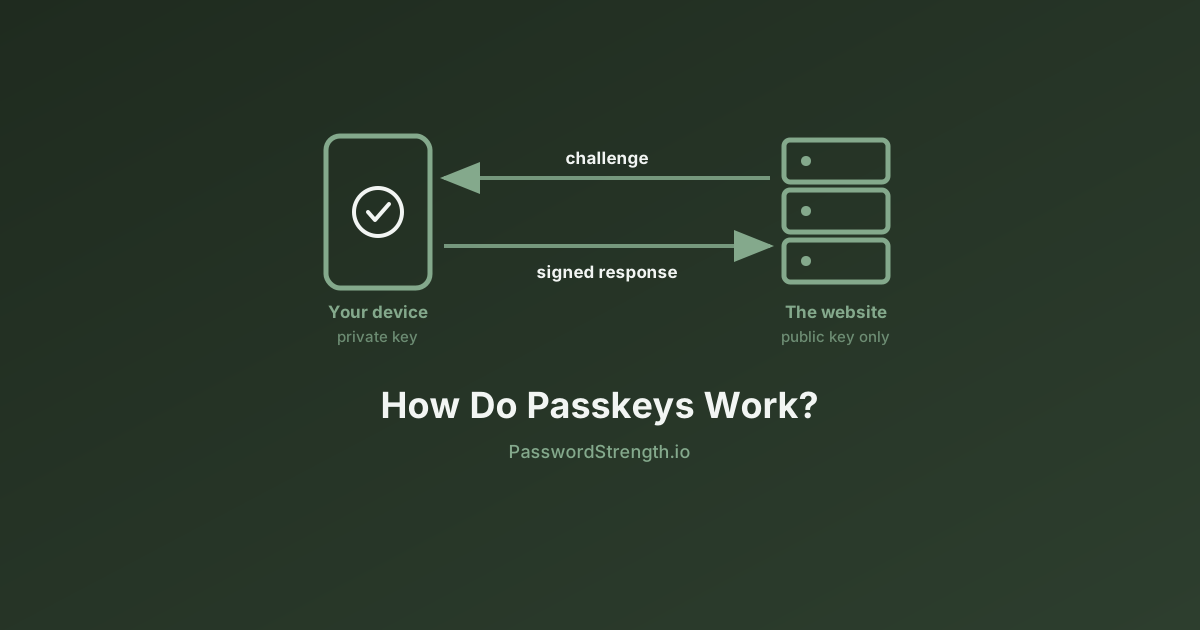
A passkey is a public/private key pair created by your device and bound to one specific website. The private key never leaves your device's secure hardware. The public key is given to the website. Logging in means proving you hold the private key without ever revealing it.
The proof works by challenge and response. The server sends a large random number, your device signs that number with the private key, and the server checks the signature against the public key it stored when you registered.
Think of the public key as a lock that the website bolts to its own front door. The site can publish that lock, print it on billboards, or lose it in a breach — a lock tells you nothing about the shape of its key. Only the key opens it, and the key never leaves your pocket.
In short: passwords work by both sides knowing the same secret. Passkeys work by only one side knowing the secret, and the other side being able to check the math.
What is a passkey and how does it work at the component level
A passkey is a FIDO2/WebAuthn discoverable credential — in plain terms, a key pair your device stores and can find on its own, without the website first telling it which account you are. Four parties are involved in every passkey operation, and keeping them straight makes the rest of this post easy.
The relying party (RP) is the website or app you are logging into. In WebAuthn terminology the server that verifies your signature is always called the relying party, because it relies on the authenticator's assertion. Its identity is captured by the relying party ID, which is normally the site's domain, such as example.com.
The client is your browser or operating system. It sits between the website and your hardware and, critically, it is the component that records where the request actually came from.
The authenticator is the thing that holds the private key and performs the signing. It can be a platform authenticator built into your device — Face ID and the Secure Enclave on an iPhone, Windows Hello and the TPM on a PC — or a roaming authenticator you carry separately, such as a USB or NFC security key.
You are the fourth party. Your fingerprint, face, or PIN unlocks the authenticator locally. That biometric never travels to the website; it only convinces the hardware in your hand to perform a signature.
FIDO2, WebAuthn, and CTAP2: who does what
FIDO2 is not a single specification. According to the FIDO Alliance, FIDO2 is the name for the W3C's Web Authentication (WebAuthn) specification and the Alliance's Client to Authenticator Protocol (CTAP) used together.
The split matters because the two halves cover different wires:
| Layer | Specification | Maintained by | What it connects | What it does |
|---|---|---|---|---|
| Web API | WebAuthn | W3C | Website ⇄ browser ⇄ server | Defines navigator.credentials.create() and .get(), the challenge format, and the response objects a server must verify |
| Device protocol | CTAP2 | FIDO Alliance | Browser/OS ⇄ authenticator | Defines how the client talks to an external authenticator over USB, NFC, or Bluetooth Low Energy |
| Umbrella term | FIDO2 | Both | The whole stack | WebAuthn + CTAP together |
When you use a built-in platform authenticator such as Touch ID, CTAP2 is often internal to the operating system and you never see it. When you tap a YubiKey or scan a QR code to use your phone as a security key for a nearby laptop, CTAP2 is the protocol doing the talking.
The bottom line: WebAuthn is the half a web developer writes code against. CTAP2 is the half that lets hardware you can hold participate. FIDO2 authentication is both, working together.
The registration ceremony, step by step
Registration is the ceremony that creates a new credential and hands its public half to the website. In WebAuthn, this is triggered by a navigator.credentials.create() call. Here is the full sequence.
-
You ask to create a passkey. You click "Create a passkey" in your account settings, usually while already logged in by some other means.
-
The server generates a challenge. The relying party server creates a cryptographically random value — the challenge — along with information about itself (its relying party ID and display name) and about your account (a user handle, username, and display name). It sends these to the page.
-
The page calls the WebAuthn API. The JavaScript on the page passes those options to
navigator.credentials.create({ publicKey: ... }). It also declares which signature algorithms it accepts, whether it wants a platform or roaming authenticator, and whether user verification is required. -
The browser stamps the origin. This is the step most explanations skip, and it is the one that defeats phishing. The browser builds a data structure called clientDataJSON containing the challenge, the operation type (
webauthn.create), and — decisively — the actual origin of the page making the request. The website cannot forge this. The browser writes it. -
The browser hands the request to the authenticator. Over CTAP2 for an external device, or internally for a platform authenticator, the browser passes the request along with a SHA-256 hash of the clientDataJSON.
-
The authenticator asks for you. It prompts for a fingerprint, face scan, or PIN. This is user verification; a simple touch with no identity check is user presence. The result is recorded as a flag in the response.
-
The authenticator generates a brand-new key pair. Not a reused one. A fresh pair, unique to this website. The private key is written into secure hardware and marked non-exportable. This is also why passkeys cannot be used to track you across sites: every site gets a different, unlinkable key.
-
The authenticator builds and returns an attestation object. This contains the new public key, a credential ID, the authenticator data (including a hash of the relying party ID), and optionally an attestation statement. Attestation, per the FIDO Alliance's passkeys.dev reference, is an optional statement that lets a relying party verify the provenance of the authenticator — useful for an enterprise that only permits certified hardware, and usually ignored by consumer sites.
-
The server verifies and stores. The server confirms the returned challenge matches the one it issued, confirms the origin in clientDataJSON is genuinely its own, and then stores the public key and credential ID against your account.
At no point in those nine steps did the private key exist anywhere except inside the authenticator.
The authentication ceremony, step by step
Authentication is the ceremony that proves you still hold the private key. It is triggered by navigator.credentials.get() and it is shorter, because no keys are created — only used.
-
You land on the login page. With a discoverable credential, you do not even have to type a username first. The browser can list matching accounts for you.
-
The server issues a fresh challenge. A new random value, different every single time. This is what makes a captured login response useless if replayed later.
-
The page calls
navigator.credentials.get(), passing the challenge and the relying party ID. It may include anallowCredentialslist naming specific credential IDs, or leave it empty and let the authenticator find a discoverable credential on its own. -
The browser again stamps the real origin into a new clientDataJSON, this time with type
webauthn.get. -
The authenticator finds the matching credential and checks that the requested relying party ID matches the one the credential was created for. A mismatch means no credential is offered.
-
You verify yourself locally. Fingerprint, face, or PIN unlocks the private key for one operation.
-
The authenticator signs. Per the W3C WebAuthn specification, the signed message is the authenticator data concatenated with the SHA-256 hash of the clientDataJSON, in that order. Both the site's identity and the browser-observed origin are therefore inside the signature.
-
The browser returns an assertion containing the authenticator data, the clientDataJSON, the signature, and the credential ID.
-
The server verifies four things: that the challenge matches the one it just issued, that the origin is its own, that the relying party ID hash is correct, and that the signature validates against the stored public key. Only then does it create a session.
Here is the same flow mapped across the three actors:
| Step | What the browser does | What the authenticator does | What the server does |
|---|---|---|---|
| 1. Challenge | Receives challenge over HTTPS | — | Generates a random challenge and remembers it |
| 2. Request | Calls navigator.credentials.get(), builds clientDataJSON with the true origin | — | Waits |
| 3. Selection | Passes request via CTAP2 or internal API | Finds credentials matching the relying party ID | Waits |
| 4. Consent | Renders the system prompt | Verifies your biometric or PIN locally | Waits |
| 5. Signing | — | Signs authenticatorData + SHA-256(clientDataJSON) with the private key | Waits |
| 6. Response | Returns the assertion to the page | Increments its signature counter | — |
| 7. Verification | — | — | Checks challenge, origin, RP ID hash, and signature; issues a session |
What crosses the wire, and what never does
Two small data structures do almost all the work in WebAuthn. If you want to know how do passkeys work technically, rather than by analogy, these two are the answer.
clientDataJSON is written by the browser. It contains the challenge, the type of ceremony, and the origin the browser genuinely observed. Because the website's own JavaScript cannot modify it before it is hashed and signed, it functions as the browser's sworn testimony about where the request came from.
authenticatorData is written by the authenticator. Per MDN's documentation, it is at least 37 bytes long and includes a hash of the relying party ID, a signature counter, flags for user presence and user verification, and any extension outputs.
| Field | Lives in | Written by | Why it matters |
|---|---|---|---|
| Challenge | clientDataJSON | Server, echoed by browser | Makes every login unique; blocks replay |
| Origin | clientDataJSON | Browser | The anti-phishing anchor — the site cannot fake it |
| Type | clientDataJSON | Browser | Prevents a registration response being reused as a login |
| RP ID hash | authenticatorData | Authenticator | Proves the credential belongs to this site |
| Signature counter | authenticatorData | Authenticator | Lets a server spot a cloned authenticator |
| UP / UV flags | authenticatorData | Authenticator | Records whether you were merely present or actually verified |
| Signature | Assertion | Authenticator | Binds all of the above together |
What never crosses the wire: the private key, and your biometric. Your fingerprint template stays on your device. The FIDO Alliance is explicit that biometric information, if used, never leaves the user's device.
Where the private key actually lives
The private key lives in dedicated secure hardware, isolated from the main operating system, and marked as non-exportable. The exact component depends on your platform.
| Platform | Secure component | What the vendor documentation says |
|---|---|---|
| Apple (iPhone, iPad, Mac) | Secure Enclave | A dedicated secure subsystem integrated into Apple SoCs, isolated from the main processor, with its own boot ROM and AES engine |
| Android | TEE or StrongBox | Key material can be bound to the Trusted Execution Environment or a Secure Element; StrongBox implementations have their own CPU, secure storage, true random number generator, and secure timer |
| Windows | TPM | Windows Hello for Business generates the key pair on the device, with the TPM generating and protecting the private key; without a TPM the key is encrypted in software instead |
| Security keys | On-key secure element | The key pair is generated and stored on the hardware token itself |
Android's documentation makes the guarantee unusually concrete: when a key is hardware-bound, key material never enters the application process and is never exposed outside secure hardware. Even a fully compromised operating system can potentially use a key but cannot extract it.
One honest nuance worth knowing: for synced passkeys, the credential is protected by your platform's end-to-end encrypted credential manager — iCloud Keychain, Google Password Manager, or a third-party provider — so that it can appear on your other devices. The "never leaves the hardware" guarantee in its strictest form applies to device-bound credentials. Synced passkeys trade a degree of that strictness for the ability to survive a lost phone.
Discoverable credentials, and synced versus device-bound
A discoverable credential — historically called a resident key — is one the authenticator stores in full, including which site and account it belongs to. That is what lets you click "Sign in" and immediately see a list of your accounts without typing anything. A passkey, in the everyday sense of the word, is a discoverable credential.
Non-discoverable credentials work differently, and the trick is clever. Per MDN, the authenticator encrypts the private key and associated data with a master key it keeps internally, then hands the resulting ciphertext to the server as the credential ID. The server stores that blob and passes it back at login; the authenticator decrypts it and recovers the key. This lets a small hardware token support unlimited accounts without unlimited storage — but it means the server has to tell the authenticator which credential to use, so you must identify yourself first.
Passkeys also come in two flavours by portability:
- Synced passkeys are backed up and mirrored across your devices by a credential manager. Lose a device, keep the credential.
- Device-bound passkeys exist only on the hardware that created them and do not sync. Higher assurance, no recovery if the hardware is lost.
Which one suits you is a practical question rather than a technical one — the trade-offs around device loss and recovery are covered in passkeys vs passwords.
Why phishing fails at the protocol level
Phishing fails against passkeys because the decision about which credential to release is made by software checking a domain string, not by a human looking at a URL bar.
Consider what happens when you land on examp1e.com — a convincing lookalike — and click sign in. Two independent mechanisms break the attack:
-
The authenticator will not produce a credential. The credential was created for the relying party ID
example.com. The browser only offers credentials whose relying party ID matches the current origin. For the lookalike domain, there is simply nothing to offer. -
Even if a signature were somehow produced, it would be stamped wrong. The browser writes the true origin into clientDataJSON, and the signature covers it. Forward that assertion to the real server and the origin check fails immediately.
This is why MDN describes the protection plainly: an attacker who creates a fake login website cannot log in as the user, because the signature changes with the origin of the website.
Compare that with a one-time code. A real-time phishing proxy can ask you for your code and relay it to the real site within seconds, because the code is just a number and carries no information about where you typed it. Passkeys carry that information in the signature itself. If you want the fuller picture of how second factors compare, see two-factor authentication explained.
What the server stores, and why breaching it is worthless
A passkey server stores your public key, your credential ID, a user handle, and a signature counter. That is essentially the whole record. There is no secret in it.
This is a genuine break from decades of authentication design. A password database, even a well-hashed one, contains verifiers that can be attacked offline — an attacker with the file can guess candidates at billions of attempts per second on rented hardware, which is why the time to crack a password depends so heavily on its length and entropy. A passkey database contains public keys, which can only verify signatures, never produce them. There is nothing to crack.
MDN puts the developer-side implication bluntly: developers do not need to hash the public key, and an attacker who obtains it cannot authenticate, because authentication requires the private key.
The signature counter adds one more defensive touch. Each time an authenticator signs, it can increment a counter included in authenticatorData. If a server ever sees a counter go backwards, that is evidence the credential may have been cloned, and it can lock the account.
The bottom line: the entire economic model of credential theft — dump the database, crack offline, replay the results across other sites — has no purchase on passkeys, because the thing worth stealing was never sent to the server in the first place. It is the most significant change in authentication architecture since salted hashing, a story traced in the evolution of password security.
Related reading
- Passkeys vs Passwords — the practical comparison: should you actually switch, and what breaks when you do
- Two-Factor Authentication Explained — how SMS codes, authenticator apps, and hardware keys compare
- The Evolution of Password Security — from plaintext files to salted hashes to public-key credentials
- How Long Does It Take to Crack a Password? — why offline attacks against password databases are so effective
- What Is Password Strength? — entropy, character sets, and what actually makes a password hard to guess
What to do next
Understanding the mechanism should change what you do next in three concrete ways.
Register a passkey on one high-value account this week. Your email account is the right place to start, because it is the recovery path for everything else. You now know that doing so generates a fresh key pair scoped to that domain and hands the site only a public key.
Stop treating the URL bar as your phishing defence on passkey-enabled sites. The origin check is doing that work for you now, in software, before any credential is released.
Do not delete your password yet. Most services still keep a password as a fallback, which means your account is only as strong as that fallback. Keep it long, unique, and stored in a manager — and check its strength if you are unsure where it stands.
The design goal of FIDO2 authentication was to remove the shared secret from the equation entirely. Once you can trace the ceremony end to end, it becomes clear how completely that goal was met: there is no secret on the server to steal, no secret in transit to intercept, and no secret in your head to phish out of you.